 Clanker Cloud
A reusable starting point
See what the week can hold before you promise the work.
Use Clanker Workspace to turn a capacity export and incoming requests into a planning workbook and a concise decision brief. This fictional studio example makes role-specific constraints visible, so an operator can compare options before agreeing dates. Reuse the method in a capacity-planning Agent with fresh weekly inputs.
Start with $20 in included credits. See usage and plans.
Start with the week and its current commitments
Add the three files to a Project. Ask for capacity-plan.xlsx and planning-brief.md. Use gross weekly hours, unavailable time and existing commitments to calculate what remains.
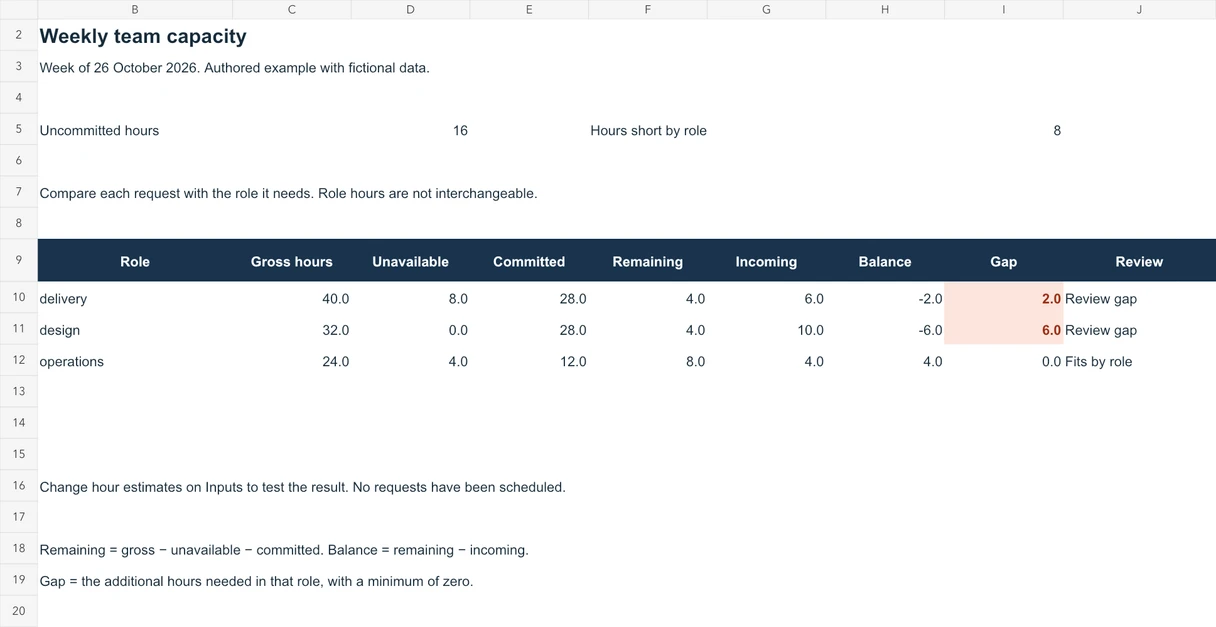
This packet has 16 uncommitted hours: four delivery, four design and eight operations. Keep the role breakdown with the total.
Compare the request with the role it needs
The proposed requests need ten design hours, six delivery hours and four operations hours. Design has a six-hour gap and delivery a two-hour gap. The operations request fits and leaves four operations hours.
A free hour in one role does not automatically cover another role’s task. Ask for options such as changing scope, sequencing work or seeking an updated estimate, then let the owner choose.
Make the weekly planning conversation repeatable
Create a capacity-planning Agent with the calculation method, your workbook layout and selected Tools. Bring a fresh export and current requests to each planning cycle.
When the manual workflow is useful, configure a hosted Schedule or Loop separately if it should repeat. Define input access, spending limits and who reviews the result.
Sources: Build an Agent around your method · Recurring work
Choose the right material for your business
Start with these fictional sources or material you are permitted to use. Choose the Project, model and Tools for the job. ZDR, data residency and encryption are coming soon.
Sources: Workspace trust center
Authored example · Fictional data
Inspect the workbook and change an input.
A working Excel example with role-specific formulas and a planning brief. The workbook starts from the same fictional inputs below; it is an authored example, with no work scheduled.
Download the finished example
- capacity-plan.xlsx
Editable source inputs, role-level calculations and gaps; formulas recalculate when inputs change.
- planning-brief.md
The proposed options and decisions for the business owner.
Check the result against its sources
- 16 hours remain before new work
- weekly-capacity.csv: delivery 40 − 8 − 28 = 4; design 32 − 0 − 28 = 4; operations 24 − 4 − 12 = 8.
- Design needs 6 more hours; delivery needs 2
- incoming-work.csv: W01 needs 10 design hours and W02 needs 6 delivery hours. Each is compared with its own role’s remaining hours.
- The operations request fits
- incoming-work.csv: W03 needs 4 operations hours, leaving 4. Role hours are not interchangeable.
Try it with a small example.
Sample files to try
Fictional inputs for this example. Download a file and add it to your Project to follow along.
- weekly-capacity.csv
Fictional weekly role hours, unavailable time and existing commitments.
- incoming-work.csv
Three fictional requests with role-specific effort estimates.
- planning-instructions.md
The fictional reporting week and the rules for comparing capacity.
Copy into a Workspace Session. Opening Workspace does not send it automatically.
Keep this starter open while you sign in. Add the sample inputs to a Project, then paste the prompt into a Session. Files and prompts are not imported automatically.
An illustrative result.
Fictional sample, written to show the expected structure. Your result depends on your inputs and needs review.
# Weekly capacity — planning draft

Remaining: delivery 4 hours; design 4 hours; operations 8 hours. Total: 16 hours.

Incoming requests: design 10 hours; delivery 6 hours; operations 4 hours.

Decision points: design needs 6 more hours and delivery 2 more hours. The operations request fits, leaving 4 operations hours.

Next conversation: agree scope, sequencing or revised estimates. No new work has been scheduled.

Illustrative draft using fictional data.
Before you use the result.
- Each role’s remaining hours follow the source definitions.
- The brief shows the design and delivery gaps separately.
- The owner can compare options before agreeing work.
Common questions.
How can an operator use AI for capacity planning?
Use current capacity, commitments and incoming requests to prepare a role-by-role workbook and decision brief. Keep estimates and owner decisions distinguishable.
Will this change our project-management system?
This starter prepares saved planning files. Updating a source system, assigning work or notifying people requires the appropriate connection and a separate authorized action.
Sources: Workspace for operators · Build an Agent around your method · Workspace trust center
Content reviewed against the Workspace Guide & FAQ. Features and access can depend on your account.